CSS媒体类型详细介绍
作者:管理员 来源:互联网 发布时间:2025-12-11 10:30:16 点击数:0
一、什么是媒体类型
CSS媒体类型(Media Types)是CSS2规范中定义的,用于指定样式表针对的输出设备类型。它们允许开发者针对不同的设备或媒体类型应用不同的样式规则。
二、主要媒体类型列表
1. all
适用于所有设备
@media all {
  body { font-family: Arial, sans-serif; }
}
2. screen
主要用于彩色计算机屏幕(最常用)
@media screen {
  body { background-color: #f5f5f5; }
}
3. print
用于打印和打印预览
@media print {
  /* 打印时隐藏不必要的元素 */
  .advertisement, .sidebar { display: none; }

  /* 设置打印颜色和字体 */
  body { color: black; font-size: 12pt; }

  /* 确保链接在打印时显示URL */
  a:after { content: " (" attr(href) ")"; }
}
4. speech
适用于语音合成器、屏幕阅读器等发声设备
@media speech {
  /* 为屏幕阅读器提供更好的体验 */
  .visually-hidden {
    clip-path: none !important;
    position: static !important;
  }
}
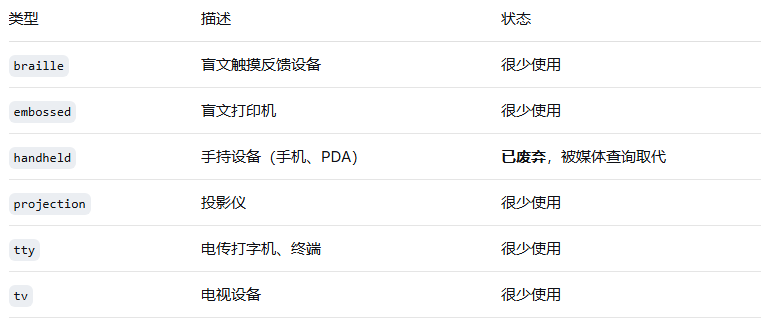
5. 其他历史媒体类型(已废弃或不常用)
三、使用方法
1. 在link标签中使用
<link rel="stylesheet" media="screen" href="screen.css">
<link rel="stylesheet" media="print" href="print.css">
<link rel="stylesheet" media="screen, print" href="common.css">
2. 在CSS中使用@import
@import url("screen.css") screen;
@import url("print.css") print;
3. 在CSS中使用@media规则
/* 基本用法 */
@media screen {
  body { font-size: 16px; }
}

@media print {
  body { font-size: 12pt; }
}

/* 同时指定多个媒体类型 */
@media screen, print {
  h1 { color: #333; }
}
四、媒体类型与媒体查询
CSS3引入了媒体查询(Media Queries),扩展了媒体类型的功能,使其更加强大和实用:
/* CSS2的媒体类型 */
@media screen { ... }

/* CSS3的媒体查询 - 更精细的控制 */
@media screen and (min-width: 768px) { ... }
@media screen and (max-width: 767px) and (orientation: portrait) { ... }
五、实际应用示例
打印样式设计
/* 打印样式表 */
@media print {
  * {
    background: transparent !important;
    color: #000 !important;
    text-shadow: none !important;
  }

  /* 调整布局 */
  body {
    width: 100% !important;
    margin: 0 !important;
    padding: 0 !important;
  }

  /* 隐藏不必要的内容 */
  nav, .sidebar, .ad-banner, .social-share {
    display: none !important;
  }

  /* 优化打印分页 */
  h1, h2, h3, h4 {
    page-break-after: avoid;
  }

  img, table, figure {
    page-break-inside: avoid;
  }

  /* 显示链接URL */
  a {
    text-decoration: underline;
  }

  a[href^="http"]:after {
    content: " (" attr(href) ")";
  }

  /* 打印页眉页脚 */
  @page {
    margin: 2cm;
    @top-center {
      content: "文档标题";
    }
    @bottom-right {
      content: counter(page);
    }
  }
}
针对屏幕阅读器的优化
@media speech {
  /* 隐藏纯视觉装饰 */
  .icon:before {
    content: "" !important;
  }

  /* 为屏幕阅读器提供更清晰的结构 */
  .visually-hidden {
    clip-path: none;
    position: static;
    width: auto;
    height: auto;
    margin: 0;
  }

  /* 控制语音属性 */
  .important {
    voice-pitch: high;
    voice-rate: slow;
  }

  .aside {
    voice-family: female;
    voice-pitch: medium;
  }
}
六、最佳实践
始终包含print媒体类型:为网站创建打印友好的版本
使用逻辑运算符组合条件:
@media only screen and (min-width: 320px) and (max-width: 767px) { ... }"only"关键字:用于隐藏旧浏览器中的样式表
@media only screen and (min-width: 768px) { ... }移动优先设计:
/* 基础样式 - 移动设备 */
body { font-size: 14px; }

/* 平板设备 */
@media screen and (min-width: 768px) {
  body { font-size: 16px; }
}

/* 桌面设备 */
@media screen and (min-width: 1024px) {
  body { font-size: 18px; }
}
七、浏览器支持
所有现代浏览器都支持主要的媒体类型(all, screen, print)
speech媒体类型支持有限,主要与屏幕阅读器相关
废弃的媒体类型(如handheld)在现代浏览器中可能不被识别
上一篇:网站设计:首页要不要“塞满”?
下一篇:网页设计中的留白艺术
相关内容: